AM SQL/Express 13 Sample Reports
|
Sales Order – Print Sales Order
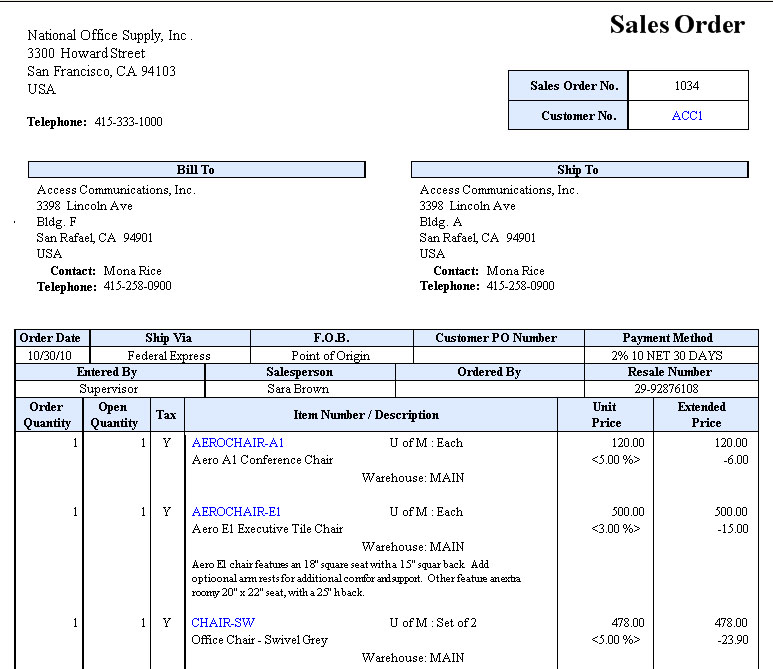
 The Print Sales Order function allows you to preview and print sales orders, which show the specific inventory items ordered by customers. You can forward the Sales Orders to your customers as acknowledgement of their orders. You can select to generate only the unprinted sales orders, only the previously printed sales orders, or all sales orders. You can opt to print for an alignment test only, to include the voided sales orders, to show the request dates or the dates when the customers expect to receive their orders, to show the masked credit card number, provided that you are granted the user access right, and to suppress the report labels' background color. You may also choose in the Export/E-mail Options area the Customer E-mail option. This automatically marks the Individual File checkbox and configures AccountMate to create only one file for each Sales Order and to send a separate e-mail for each Sales Order to the e-mail addresses set up in the customer record. On the other hand, you may manually enter the desired customer e-mail address(es) and have the discretion of either marking or unmarking the Individual File checkbox. Unmarking this checkbox configures AccountMate to create only one file for all the Sales Orders that meet the report criteria and to send a single e-mail for all the Sales Orders. You can print a sales order on a pre-printed form or on ordinary paper. You
can configure these settings in the SO Module Setup -> Printing tab.
 |


