


|
|
|
 |
In an increasingly competitive Software
|
|
AccountMate 7 for SQL or Express Instant Access to Customer Information
Immediate access is available for viewing customer balances, past due totals, payment history on
outstanding invoices, open credit, available credit and year-to-date and accumulated-to-date sales
totals while processing a sales quote or order.
Enhanced Customer Maintenance Functions
Track and View YTD Sales—View details of each customer’s Year-to-Date sales to facilitate
negotiations for more competitive pricing and credit terms or to process sales orders. Year-to-Date
sales information is calculated based on total sales made to a customer within a user-defined year.
Customer Ledger Card—Drill down information displays details of a customer’s sales invoices and the related payment information, credit invoices, invoice line item distribution, finance charges, taxes, freight and customer deposits. 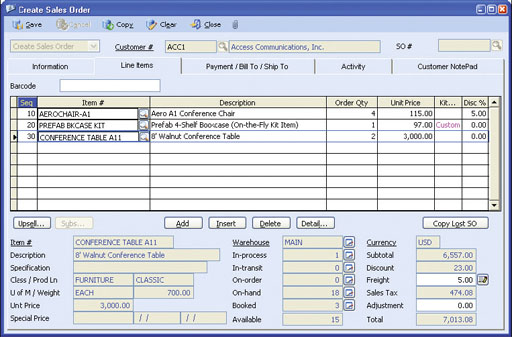 Create Sales Order–Line Items Tab
Activity Tab—Record and track in detail contacts made with the customer through the Activity
tab. An unlimited number of activity records can be defined with unlimited status values to represent
different contact phases for each activity. Administrators can also define access rights
to view and/or update Activity tab entries.
Comprehensive Inventory Information
Add a picture of the product to each inventory item record. Enter product notes in the accompanying
inventory notepad. These powerful customer-service tools can be quickly accessed while processing
customer orders. Inventory information – such as on-hand quantities, on-order quantities, booked
quantities, item classes and product lines. These items are also visible on the sales order screen.
Multiple Substitutes for Inventory Items
Each inventory item can be assigned multiple substitute items that can be used to fill orders for items that
have insufficient on-hand quantities.
Multi-level Pricing for Inventory Items
Set multi-level prices for inventory items. Different prices can be
assigned to inventory items based on a customer’s price code or
based on the order quantity.
Maintain Sales Tax Entities
Multiple sales tax entities can be set up and attached to one or more
sales tax codes. You can define a tax rate, active/inactive status and
separate sales tax payable and sales tax cost General Ledger
Account IDs for each sales tax entity. For more complex tax policies,
there is the capability to set minimum and maximum taxable and tax
amounts, and a rounding method.
Built-in Multi-Currency Feature
When multi-currency is activated, a foreign currency code can be
assigned to a customer, providing billing in the appropriate currency.
This allows sales prices for items sold to foreign customers to be
properly translated to the corresponding foreign currencies without
having to manually calculate the foreign price values.
Validation of Customer Credit Limit
The Sales Order module allows defining whether transactions will be
allowed for customers who exceed their credit limit. This setting is
defined separately for different stages of the sales order process to
provide flexibility to authorize creation of sales orders for customers
who exceed their credit limit but not allow shipments of orders to
them. This same validation can also be performed when importing
sales orders. There is the option to include Sales Order shipments
not yet invoiced during credit limit validation. This gives the optimum
flexibility to enforce customer credit policies.
Customize Kit Formula on Each Sales Order
AccountMate provides the ability to reconfigure the composition of
kit items on each sales order. This provides the required flexibility to
adjust the kit components to meet customers’ distinct preferences.
The customized kit formula is tracked to facilitate processing of
customer returns.
Track Lost Sales Opportunities
Sales quotes can be approved and converted into orders for a
portion of the order quantity. Sales orders can also be cancelled after
partial or no shipment. There is the option to keep a record of the
portion that was not approved or not shipped, and assign a reason
for the lost sales opportunity in order to facilitate sales analysis. Lost
sales quotes or cancelled sales order transactions can be retrieved
and can be converted into a new quote or order.
Shipping Sales Orders Is Easy
With the Sales Order module, it is possible to see each item’s
open order quantity. Simply click a button to ship all the open
order quantities or enter each shipment quantity manually. During
shipment, the system validates the units that are on-hand and
warns if shipment will result in negative on-hand quantity. When
integrated with the Kitting module, shipments of on-the-fly kit
items automatically reduce the total costs and quantities of their
components to ensure real-time and accurate tracking of
inventory data.
Advanced Billing Prior to Shipment
You can opt to bill the customer before shipping the order. When
integrated with the Accounts Receivable module, the pro-forma
invoice used to bill a customer is easily converted into a regular
Accounts Receivable invoice to facilitate application of deposits
received on the advance bill.
Blanket Sales Orders
Set up and authorize customer orders for a certain quantity of
inventory items within a specific period of time. This allows you to
lock in any special price and/or discount offered to a customer.
Blanket sales orders are automatically converted into sales orders
when released, thereby enabling shipment against released orders
and tracking of outstanding orders. Ending dates can be established
for each blanket sales order.
Recurring Sales Orders
Multiple recurring sales order templates can be set up for each
customer. Sales orders can be set to recur at different intervals with
a defined limit to the number of recurring cycles and/or a recurring
end date. This saves valuable time and reduces data-entry errors.
Use this feature to process standing orders for fixed quantities of
an item or a service.
Mass Cancellation of Open Orders
Easily cancel open orders from a range of sales orders so that your
inventory booked quantity reflects the actual outstanding sales orders
only, thereby facilitating scheduling of purchases and/or material
requirements planning. The Cancel Sales Order/Open Order function
allows you to set parameters for canceling open orders. Indicate one
or a range of customer numbers, salesperson numbers, sales order
numbers and/or order dates. Each qualified sales order record
is displayed along with the line items and quantities that are not
yet shipped. To cancel, simply mark the corresponding check
box beside the sales order record.
Integration with the General Ledger, Accounts Receivable, Upsell Management, Customer Inventory Manager, Inventory Control, Pricing Control, Inventory Specification, Lot Control and Kitting Modules
Other Features
AccountMate Software Corporation © AccountMate Software Corporation. All rights reserved. Reproduction in whole or in part without permission is prohibited. The capabilities, Software Requirements and/or compatibility described herein are subject to change without notice. Contact AccountMate or Authorized AccountMate Solution Provider for current information. |
|||||||||||||||||||||||||||||||||||||||||