


|
|
|
 |
AccountMate’s Return Software
|
|
AccountMate 7 for SQL or Express Set Up Unlimited Return Codes
You can create multiple return codes using predefined return actions. Each return code defines the
action you want the vendor to take on the returned item such as whether they are to be repaired,
replaced, substituted or credited against your account.
Set Vendor Warranty Period
Define a different warranty period for each vendor from whom you purchase an inventory item.
Use this as a guide to determine whether your Return to Vendor Authorization (RTV) order falls
within the vendor’s prescribed warranty period.
Manual or Automatic RTV Number
The option exists to assign an RTV number to each purchase return transaction either manually or
by having the system automatically generate it. This flexibility is most useful for those companies
that prefer to use their vendors’ Return Merchandise Authorization (RMA) numbers as part of their
RTV numbers to easily cross-reference their vendors’ return documents with their own.
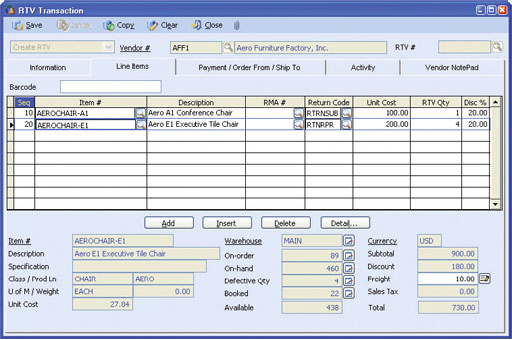 RTV Transaction–Line Items Tab
Track Progress of Purchase Returns
The system allows you to record the shipment of purchase returns and track the receipt of
repaired, replacement or substitute items. This allows for more effective monitoring of the status
of each purchase return. Each function automatically updates the inventory quantities and balances
of the items returned and those of their substitute items, if applicable.
Match Returns against a Purchase Order
As an additional control over your purchase return process, set the system to require that a purchase
order be associated with each RTV line item. This allows you to compare the purchase return quantity
against the unreturned Purchase Order line item receipt quantity to guard against returns in excess of
purchases. By activating the Use Vendor Part Number for Purchase
Order Entry feature, the system will automatically show the vendor
warranty period that can be validated against the purchase date and
return date. This helps to ensure that purchase returns are processed
within the warranty period.
Purchase Order and RMA Order Copy Options
Instead of entering line items and other information when creating
the RTV order, the flexibility exists to copy the line items as well as
the item descriptions, unit costs and remarks from the associated
Purchase Order or Return Merchandise Authorization order. This
saves time and minimizes data entry errors.
Option to Require a Claimperson for Each RTV Transaction
You can require the designation of a Claimperson (a contact person
in your company in charge of processing RTV orders). This is most
suited for companies that have an RTV processing system separate
from their regular purchasing system.
Option to Post Debit Invoice on Completed RTV Orders
You have the ability to post a debit invoice immediately after saving
a completed RTV order for purchase returns with assigned return
codes that have a Credit action (i.e. Return for Credit). This saves
data entry time and reduces keystroke errors since most of the
information required to record an Accounts Payable invoice is
automatically taken from the completed RTV transaction record.
Gain or Loss from Inventory Substitution or Replacement
The variance between the actual cost of substitute or replacement
items and the RTV order cost is calculated and recorded appropriately
as either a gain or a loss. This allows for the segregation of RTV cost
variances from regular cost variances to help more effectively manage
your purchase returns.
Defective Inventory Adjustment
On-stock items that become defective may be flagged for return
through the Defective Inventory Adjustment function. Using the same
function, you can post a cost adjustment to capitalize any expenses
incurred in relation to the defective inventory.
Defective Inventory Transfer
Items intended for the vendor to repair may be transferred from one
warehouse to another in order to properly segregate defective items
from regular inventory. You can designate a specific warehouse where
defective items await repair and use that warehouse in defective
inventory transfers. This allows for tracking of the costs and quantities
of defective inventory separate from regular inventory. You can use
this warehouse to process purchase returns without affecting normal
sales and purchasing operations.
Integration with General Ledger, Accounts Payable, Purchase Order, Inventory Control and Return Merchandise Authorization Modules
Other Features
AccountMate Software Corporation © AccountMate Software Corporation. All rights reserved. Reproduction in whole or in part without permission is prohibited. The capabilities, Software Requirements and/or compatibility described herein are subject to change without notice. Contact AccountMate or Authorized AccountMate Solution Provider for current information. |
||||||||||||||||||||||||||||||||||||||||