


|
|
|
 |
With AccountMate’s Payroll
module, you can set up
salaried, hourly and time
card/piece Software
|
|
AccountMate 7 for SQL or Express Instant Access to Employee Information
You can drill down for instant access to an employee record which allows viewing or editing salary,
W-4, earnings, paid leave benefits, dependents, deductions, quarterly taxable earnings and payroll
tax information. You are able to update the assigned state and local tax codes, resident status,
additional withholding amounts and the setting to override system-calculated withholding taxes.
This provides flexibility to review and update employee data before processing payroll.
Additional State Tax Codes
Define up to three additional tax codes for each tax state. For each additional tax, you can set
up employee and employer tax rates and define a maximum wage base.
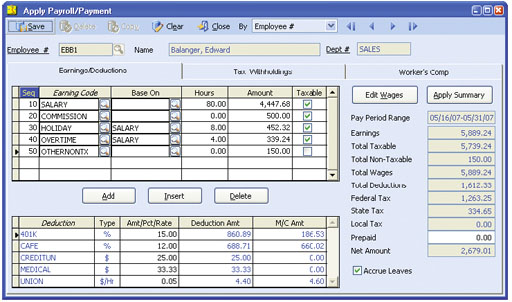 Apply Payroll
Manage Employee Hours and Pay
The Payroll module allows for tracking of each employee’s work hours through the use of earning
codes. These may be set up for regular work hours, overtime, holiday or leave time. They can also
represent earnings that are independent of work hours such as tips, commissions, bonuses and
fringe benefits. By assigning a department to each earning code, you are able to track departmental
accountability for employee work hours. The pay rate defined for an earning code is applied by
default to each employee who is assigned to the associated department allowing standardized pay
rates by department and work type.
Flexible Wage, Tax and Worker’s Compensation Expense Distribution
Allocate the expenses for employee wages, employer payroll taxes and worker’s compensation claims
to multiple General Ledger Account IDs and define a distribution percentage for each. This gives you
maximum flexibility to allocate payroll costs to the appropriate cost centers in the organization.
Accrue, Track and Adjust Paid Leave
Accrue paid leave time for qualified employees. Unlimited paid leave
records can be set up for vacation, sick, personal or any other paid
leave benefits that your company offers its employees. Define the
accrual hours, hours required to qualify for accrual and the
maximum leave hours that can be accrued or carried over into
another year. These settings are applied based on the assigned
employee tier. Accrual may be done at the start of the year or each
time you apply payroll.
Unlimited Deductions with Option for Employer Matching/Contribution
Set up an unlimited number of deductions and then apply any
number of them to each employee. Indicate whether a deduction
is to be withheld as a fixed amount per pay period, a percentage
of earnings or a fixed rate per hour worked. The capability exists
to define whether the deduction will be based on gross or net pay,
set a maximum deduction per payroll transaction and set an annual
deduction limit. Alternatively, you can apply deduction amounts and
annual limits based on the employee’s age, as in the case of 401(k)
plan contributions. You are able to indicate whether a deduction is to
reduce federal or state taxable wages. If applicable, you can also set
parameters for calculating employer matching and/or contributions
for these deductions.
Calculate Liability for Worker’s Compensation
AccountMate provides you the means to calculate and track liability
for worker’s compensation. Set up an unlimited number of worker’s
compensation codes and worker’s compensation groups. For each
combination of worker’s compensation code and group, you can
enter the rate and annual limit set by each state, as well as the
experience factor that applies to your company. Apply these worker’s
compensation codes and groups to earning codes and employee
records to facilitate calculation of worker’s compensation liability on
qualified employee payroll transactions.
Apply Payroll Automatically or Manually
The automatic application of payroll is a fast and easy way to
accrue payroll for a range of employees or independent contractors.
If you want the flexibility to review, amend, apply or skip application
of payroll for certain employees, you have the option to apply payroll
manually. Regardless of the method used, the system calculates
earnings, deductions, employer matching/contributions, paid leave
accruals, worker’s compensation and payroll tax amounts based
on the data and settings defined for each employee.
Record Time Card, Piece Work or Additional Payment Transactions
Enter time card information using the preset earning codes will save
you valuable time. Record piece work transactions for employees
who are paid based on their output rather than the amount of time
worked. In addition, you can record bonuses, commissions, fringe
benefits, cash conversion of unused leave time and other similar
employee payments. Time card, piece work and additional payment
records can be processed for calculation of the corresponding
deductions, employer matching/contribution, paid leave accrual,
worker’s compensation liability and payroll taxes.
Support 1099 Payments
The Payroll module supports 1099 payments to independent
contractors and tracks these payments for generation of 1099
reports, including printing on 1099-Misc forms. You are able to
print 1099-Misc forms for the prior or current tax year.
Alerts Help Prevent Duplication of Payment
The system alerts you when a time card has been recorded for an
employee during the day. It also alerts you if there are unpaid applied
payroll records for the employee for whom you are applying payroll.
Record Payroll After-the-Fact
This function allows for the recording of payroll checks generated
outside the system and the related earnings, deductions and payroll
taxes. This is useful for companies that implement the Payroll system
part way through the year but need complete payroll data to
generate accurate W-2 and other tax reports by year’s end.
Support Direct Payroll Deposits and EFTPS Payments
The system supports direct deposit of employee payroll checks
through either the National Payment Corporation or the Automated
Clearing House network. For each employee, you can define up to
three direct deposit bank accounts.
AccountMate also supports the electronic deposit of Form 940 and 941 federal payroll taxes via the Electronic Federal Payment System. This enables the remittance of payroll taxes directly to the IRS. Flexible Check Printing and Recording Options
Print checks on either pre-printed or logo check stock. Customize
the order in which the bank routing number, account number and
check number that are printed using the Microline font that comes
standard with AccountMate. In addition, choose to print the
employee’s social security number on check stubs using an
encryption format that you define.
The system also supports recording of handwritten checks to pay off existing applied payroll records. This flexibility makes it easy to record the issuance of payroll checks outside the Payroll system in case of emergency. Allow Recalculation of FUTA/SUTA
Recalculate your FUTA and SUTA liabilities for quick adjustment
to changes in FUTA and SUTA tax mandates (i.e. rates or maximum
wages) that may occur after you have issued paychecks.
Integration with General Ledger, Accounts Payable and Bank Reconciliation Modules
Other Features
AccountMate Software Corporation © AccountMate Software Corporation. All rights reserved. Reproduction in whole or in part without permission is prohibited. The capabilities, Software Requirements and/or compatibility described herein are subject to change without notice. Contact AccountMate or Authorized AccountMate Solution Provider for current information. |
|||||||||||||||||||||||||||||||||||||||||