


|
|
|
 |
With AccountMate’s Purchase
Order module, you have better
control over a full range of
purchasing activities. You can
record vendor lead times and
plan purchases based on Software
|
|
AccountMate 7 for SQL or Express Instant Access to Vendor Information
Always have instant access to a vendor’s balance, open debit, available credit and year-to-date and
accumulated-to-date purchase totals while processing a purchase order. You can also preview the
purchase order before it is printed to ensure accuracy and compliance with your purchasing policies.
Comprehensive Inventory Information
Each inventory item record can have a picture of the product. Product notes can be added in the
accompanying inventory notepad. These powerful tools can be quickly accessed while placing
orders with vendors to reduce the potential of placing an order for the wrong item. Inventory
information—such as on-hand quantities, on-order quantities, booked quantities, item classes
and product lines—is also visible on the purchase order screen.
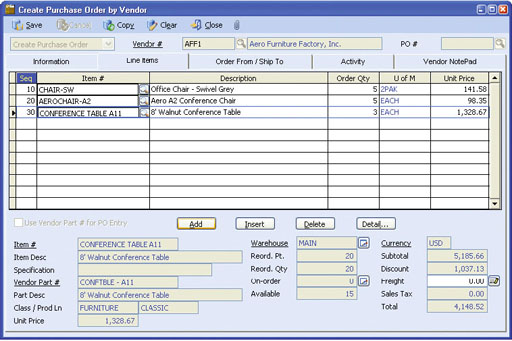 Create Purchase Order by Vendor—Line Items Tab
Enhanced Vendor Maintenance Functions
Track and View YTD Purchase—View details of your Year-to-Date purchases from a vendor
to facilitate negotiations for better pricing and credit terms or to process purchase orders. Year-to-
Date purchase information is calculated based on your company's total purchases from a vendor
within a user-defined year.
Vendor Ledger Card—Drill down information displays details of the vendor’s balance, showing the invoices, prepayments, payments and invoice distribution. Activity Tab—Record and track in detail contacts made with the vendor through the Activity tab. You can define an unlimited number of activity records, with unlimited status values to represent different contact phases for each activity. Define access rights for various AccountMate users to view and/or update Activity tab entries. Archive Deleted Vendors—Inactive vendors that have no outstanding balance can be deleted and archived. Archived vendor records can be reactivated at any time, eliminating the need to re-enter data. Purchase Scheduling and Material Requirements Planning for Inventory Items
To facilitate customer order processing, set the system to check inventory on-hand quantities. Since stock
items and manufacturing components may be purchased, you can
enter vendor lead time information. This data combined with safety
stock, reorder point
and quantity is available on the Purchase Requirement Report that
you can use as an aid to schedule your purchases and for material
requirements planning.
Multiple Functions Expedite Purchase Order & Quote Creation
Easily create purchase orders and quotes by choosing from among
four different Purchase Order and Purchase Quote creation options:
Support Multiple Warehouses on a Purchase Order
Assign a different receiving warehouse to each purchase order line
item to facilitate processing of a single purchase order that must be
delivered to multiple locations. For multi-delivery-location orders,
each warehouse address is printed at the bottom of the purchase
order document.
Purchase Receipt Accrual Options
Users have the option to accrue liability for purchase receipts for
which no invoice has been received so that your inventory quantities
match the inventory General Ledger account balance. When accruing
liability for these receipts, choose between two accrual options: by
line item quantity or by receipt amount. Companies that invest heavily
in inventory may choose to accrue by line item quantity to allow for
a more detailed matching of their purchase receipts against their
vendors’ invoices. Others may opt for the convenience of accruing
by receipt amount especially when they purchase few inventory items
from one or two vendors and invoiced costs very rarely vary from
estimated PO costs.
Accrue Landed Costs
When importing inventory items from a foreign vendor, you will incur
additional costs to transport these items to your warehouse. These
additional costs, sometimes referred to as landed costs, include
shipping costs as well as cross-border fees such as import duties
and taxes. Since these costs can be substantial, it is good business
practice to separately track and account for these landed costs.
The Purchase Order module allows you to accrue landed costs
and allocate them among the purchased items to correctly reflect
inventory costs and more accurately determine profit margins. When
integrated with the Accounts Payable module, you can reverse the
accrued landed costs when you record the corresponding vendor
invoice.
Define Complex Discount and Due Date Terms
An unlimited number of pay codes can be created to define the
terms of sale granted by your vendors. Complex discount and due
date terms can be defined through a date table. Define the discount
day, discount month, due day and due month of invoices dated on or
before a particular day of the month, or choose to use End-of-Month
discount and due terms. You can assign a default pay code to each
vendor, thereby reducing order entry time. You are able to overwrite
the default pay code for each purchase order that is processed.
Built-in Multi-Currency Feature
When multi-currency is activated, a foreign currency code can be
assigned to a vendor, providing billing in the appropriate currency.
This allows estimated purchase costs for items sourced from foreign
vendors to be properly recorded and allocated.
Blanket Purchase Orders
You can set up and authorize orders for a certain quantity of
inventory items within a specific period of time. This allows your
company to lock in any special price and/or discount offered by
the vendor. Blanket purchase orders are automatically converted
into purchase orders when released, thereby enabling you to process
receipts against the released orders and track outstanding orders. An
expiration date can be established for each blanket purchase order.
Import and Export Purchase Orders
Making use of the built-in flexibility of the Purchase Order module,
you can create purchase orders by importing data from a text file.
In addition, you are able to export existing purchase order data to
text files. Both features allow you to select the actual import/export
fields and the order in which these fields are arranged in the file,
thereby saving data entry time and improving order accuracy.
Mass Cancellation of Purchase Order Backorders
Easily cancel backorders from a range of purchase orders so that
your inventory on-order quantity reflects the actual outstanding
purchase orders only. This function allows you to set parameters for
canceling backorders. Indicate one or a range of vendor numbers,
buyer names, purchase order numbers and/or order dates. Each
qualified purchase order record is displayed along with the line items
and quantities that are backordered. To cancel, all you need to do
is select the check box beside the purchase order record.
Multiple Vendors Tracked for Each Inventory Item
Inventory items may be purchased from different vendors at different
units-of-measurement. When Purchase Order is integrated with the
Inventory Control module, multiple vendors can be tracked for each
inventory item, with each vendor’s price converted to the smallest
unit-of-measurement for effective comparison. A Best Price Listing
feature aids in determining the best vendor price to help keep
purchasing costs at a minimum. If you have foreign currency vendors,
enter the inventory item’s unit price in the vendor’s currency and
eliminate manually converting vendor prices. When creating purchase
orders, the system uses the inventory vendor record to recommend
either a designated default vendor or the best price-per-unit vendor.
Temporary Vendor Option Helps Manage Number of Vendor Records
Assign a “Temporary” status to your vendor records which will
be archived during period-end closing when their balances reach
zero. This keeps such records separate from your active vendor
list, allowing you to keep it at a more manageable size.
Integration with General Ledger, Accounts Payable, Inventory Control, Return to Vendor Authorization and Sales Order Modules
Other Features
AccountMate Software Corporation © AccountMate Software Corporation. All rights reserved. Reproduction in whole or in part without permission is prohibited. The capabilities, Software Requirements and/or compatibility described herein are subject to change without notice. Contact AccountMate or Authorized AccountMate Solution Provider for current information. |
|||||||||||||||||||||||||||||||||||||||||