


|
|
|
 |
If you need the ability to
set up a complex pricing
structure easily and quickly,
AccountMate’s Pricing
Control module is a
productive tool for you.
Software
|
|
AccountMate 7 for SQL or Express Establish a Multi-Tiered Pricing Structure in One Easy-to-use Screen
Users can define Basic Prices and Minimum Prices for an item in one screen. This feature also
allows for establishment of unlimited Multi-Level Prices by Price Code or Quantity.
Set Minimum Selling Prices for Your Inventory
Minimum prices can be defined to help ensure that you maintain a nominal margin or at least
recover your cost on the goods you sell. Set minimum prices as a Percentage Above Cost, a
Fixed Amount Above Cost or a Fixed Amount.
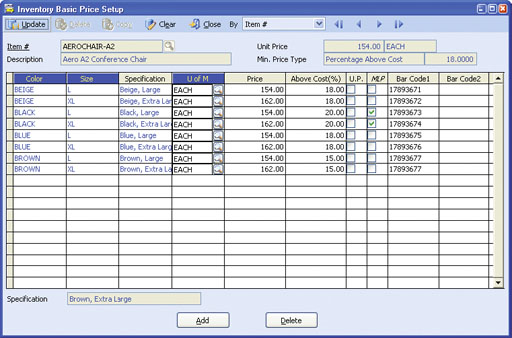 Inventory Basic Price Setup
Variable Pricing Based on Unit-of-Measurement and Item Specification
Define different prices (i.e. Basic Price, Multi-Level Price by Price Code or Multi-Level Price by
Quantity) for each unit-of-measurement and item specification you assign to the item. Each time
the item is sold with a particular item specification using a specific unit-of-measurement, the system
will suggest the associated price (unless another price option belonging to a higher level in the
pricing hierarchy is available).
Current Customer Price Feature
This feature allows you to specify that either the Last Sales Order Price or the Last Invoice Price will
remain in effect for a particular customer for a specified period of time. When a sales order or invoice
is created for the customer within the specified period, the system will recommend the price on the
customer’s last sales order or invoice. Activate this feature in Accounts Receivable or Sales Order
Module Setup and then apply or customize the setting per customer.
Associate Prices with Your Barcodes
Expand the use of barcodes by assigning a different one for each
item and unit-of-measurement combination. A different price may be
assigned to each barcode. Each time you enter or scan a barcode
value when processing sales transactions, the system will suggest the
price associated with the barcode ID entered.
Integration with Sales Order, Accounts Receivable, Inventory Control and Inventory Specification Modules
Other Features
AccountMate Software Corporation © AccountMate Software Corporation. All rights reserved. Reproduction in whole or in part without permission is prohibited. The capabilities, Software Requirements and/or compatibility described herein are subject to change without notice. Contact AccountMate or Authorized AccountMate Solution Provider for current information. |
||||||||||||||||||||||||||||||||||||||||