


|
|
|
 |
With AccountMate’s
Manufacturing module, it
allows for you to easily and
efficiently create work orders
and explode jobs into virtually
unlimited levels of raw
material, labor, machine and
subassembly components.
Software
|
|
AccountMate 7 for SQL or Express Easy to Manage Bill of Materials
At the heart of the Manufacturing module is the bill of materials. You can easily set up bills of materials
for parent items using the inventory, machine and labor records available in the system. You can
define the ratio of component items required to produce one unit of a parent item based on the
actual production formula or recipe. Also customize labor and machine production rates on the bills
of materials. Best of all, the bills of materials may be updated at any time without affecting the
production formula defined on existing work orders.
Material Requirements Planning for Component Items
To facilitate production scheduling, set the system to check inventory on-hand quantities at
each production stage in which they are used. Since component items may be manufactured
or purchased, you can also enter manufacturing lead time and vendor lead time information.
This data combined with safety stock, reorder point and quantity and other inventory quantity
information is available on the Items Requiring Production Report that can be used as an aid
for material requirements planning.
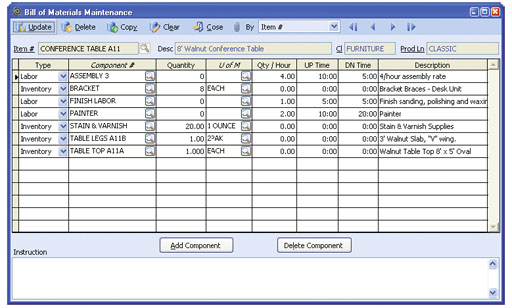 Bill of Materials Maintenance
Track Availability, Costs and Production Rates of Machine and Labor Resources
Machine and labor costs can be applied to jobs through bills of materials. You can enter
the following data for each machine or labor record:
Unlimited Notes and Manufacturing Instructions
Machine, labor and inventory records each come with NotePads
for unlimited note-keeping. This allows for entering of unlimited
manufacturing instructions and recipes for each bill of materials.
These remarks and instructions are copied onto each work order
where the components or bill of materials are used.
Ability to Copy Data
The Manufacturing module’s copy feature significantly reduces dataentry
time and keystroke errors. Components can be copied from an
existing bill of materials to a new record where they can be revised
if necessary. Information can be copied from existing inventory, labor
or machine records to new ones where they can be edited. Copying
of bills of materials and component records can be done within the
same company or across companies. Line items can also be copied
from an existing work order or from an open sales order. For further
convenience, the system can be set up to include the backorder
quantity when copying from an open sales order.
Multiple Start Dates and Request Dates for Jobs
Work orders calling for the production of a master item and some
of its components (i.e. subassemblies) can be split into several jobs,
with each job starting on a different day. Large production orders can
also be split into separate work order line items, with a separate request
date assigned to each line item to facilitate resource scheduling.
Unlimited Master Items and Job Levels
Each work order can include an unlimited number of master items to
be produced. Each master item on the work order can be exploded
into an unlimited number and level of jobs, each consisting of its own
machine, labor and raw material components.
Automate Work Order Explosion and Work-In-Process Posting
Work orders can be exploded as they are created or they can be
exploded at a later time to reduce data entry time. Work orders can
be automatically posted to work-in-process (WIP) as soon as they
are saved. Alternatively, you can choose to post finished jobs
without posting to WIP. These options give the flexibility to record
the progress of each work order in a manner that best suits your
production model.
Expedite Manufacturing by Using Available Subassemblies
Save production time by choosing to fill all or part of a job’s subassembly
needs from existing stock, rather than manufacturing
all subassemblies.
Overbooking of Resources Can Be Prevented
When posting work orders into process and when posting finished
jobs, the system allocates the raw materials and subassemblies to
each job and compares these allocated resources against what is
available in the system. To help prevent overbooking of resources,
the Manufacturing module will not allow processing of work orders
that use inventory in excess of on-hand quantity unless the “Allow
Overuse of Inventory for Component Item” option in the Manufacturing
Module Setup is marked.
Flexible Posting and Voiding of Work-In-Process
Work order line items can be put into process and WIP can be
voided for any master item line on a work order. This saves you
time since the system automatically posts or voids WIP for all
subsidiary jobs. Alternatively, jobs can be put into process and
WIP can be voided for a specific job without affecting other jobs
in the work order. This kind of flexibility enhances the value of
the Manufacturing module as it helps lower data entry costs
while still giving you detailed status tracking of work orders.
Flexible Posting of Finished Jobs
Work orders can be posted as finished for a particular master item.
This saves time since all subsidiary jobs are simultaneously posted
as finished. Alternatively, work orders can be posted as finished by
job. This allows gradual release of finished quantities on a work
order without waiting for completion of other jobs that may still be
in process. Finished units may be released immediately to inventory
for use in sales or for further production or they may be held until
they pass quality assurance checking.
Option to Allocate Work-In-Process Components in Proportion to Finished Quantity
All or some units on a work order may be simultaneously placed into
process but finished at different times. There is an option to allocate
the WIP components between finished and unfinished work order
quantities or apply them to finished units only. This gives you the
ability to more accurately assign production costs to finished and
work-in-process inventory.
Choice of Calculation Methods
The Manufacturing module provides significant flexibility in calculating
production and overhead costs. You are able to apply either the
actual or standard costs to finished goods or apply actual costs
to finished subassembly items as well as standard costs to finished
master items. Choose to apply overhead costs to finished items
in addition to the applied actual or standard costs. When applying
overhead costs, the decision can be made to assign an amount
or apply a percentage of production costs.
Ability to Cancel Work Orders and Backorders
Work orders can be closed without completing all units of the ordered
items. Backorders on partially completed work orders can also be
cancelled, returning unused items to inventory and automatically
releasing labor and machine resources.
Wide Selection of Documents and Reports
Work orders, routing slips, production slips and bills of materials can
be printed for use in production and scheduling. A wide variety of
inventory, machine, labor, work order, production and finished job
reports can be generated. These can be used to analyze production
variances and inefficiencies in order to help reduce manufacturing costs.
Integration with General Ledger, Inventory Control, Lot Control, Sales Order and Purchase Order Modules
Other Features
AccountMate Software Corporation © AccountMate Software Corporation. All rights reserved. Reproduction in whole or in part without permission is prohibited. The capabilities, Software Requirements and/or compatibility described herein are subject to change without notice. Contact AccountMate or Authorized AccountMate Solution Provider for current information. |
|||||||||||||||||||||||||||||||||||||||||