


|
|
|
 |
With AccountMate’s Lot
Control module, add the
power of a complete lot
or batch control system
to your Inventory Control.
You have the ability to track
units of lot controlled items
from purchase or production
through inventory and sale,
as well as Software
|
|
AccountMate 7 for SQL or Express Effectively Manage Critical Inventory
There is instant access to the status, effective date and disposition of critical or perishable inventory
items. This enables units of a lot controlled item to be tracked, used or sold well before their
indicated perishable dates. Customers to whom such items were sold can be promptly identified
and notified of any problems with the items they purchased or plans for product upgrades.
Quick Assignment of Lot Numbers
You can assign lot numbers to the units of an item stored in a specific warehouse bin, received on
a particular purchase order or built as a customized kit item on a sales order. Lot numbers can be
assigned to standard kits as they are built. Multiple lot numbers can also be assigned at a time to
a batch of lot controlled item units.
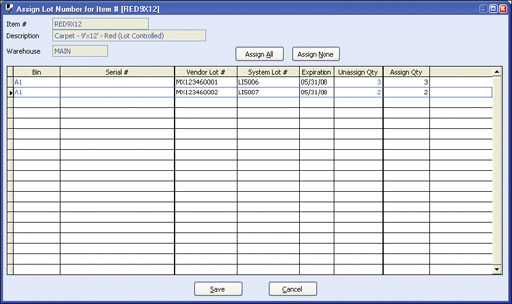 Assign Lot Number
Assign Serial Numbers to Lot Controlled Items
Lot controlled items can be serialized. The assignment of a serial number to each lot controlled
item permits the tracking of a specific cost for each unit.
Track Vendor Lot Numbers
Track the vendor’s lot numbers and cross-reference them with your own lot numbers. System
lot numbers are those that you assign using your own lot number series and are especially useful
for items manufactured in-house. These can also be assigned to items acquired from vendors.
Recording vendor lot numbers facilitates cross-referencing of lot controlled items purchased
from vendors with the lot numbers you assigned to the items. This makes it easier to track these
units in case the vendor recalls or modifies the inventory you have already sold to customers.
Monitor Expiration Dates
View the expiration date of each lot. You can quickly check for
on-hand quantities of items belonging to a particular lot that are set
to expire on a certain date allowing you to take them out of inventory
as they expire. This also helps to verify the expiration dates of
available lot controlled units when processing customer orders.
View or Print Inventory Lot Recall Report
You can review the transactions that involve particular system lot
numbers or vendor lot numbers using the Inventory Lot Recall
Report.
Easily Identify Lot Controlled Items
Lot controlled items are clearly flagged on the inventory screen and
on the transaction lines of sales orders, invoices and received goods
screens.
Lot Numbers Can Be Printed
Lot numbers can be printed on Shipment Reports, Packing Slips,
Invoices and Inventory Lot Recall Reports which provide the ability to
quickly verify when and to whom you sold units from a particular lot.
This can be a helpful aid to you and your customer in case of a
product recall, modification or upgrade.
Integration with Inventory Control, Purchase Order, Sales Order, Accounts Receivable, Kitting and Manufacturing Modules
AccountMate Software Corporation © AccountMate Software Corporation. All rights reserved. Reproduction in whole or in part without permission is prohibited. The capabilities, Software Requirements and/or compatibility described herein are subject to change without notice. Contact AccountMate or Authorized AccountMate Solution Provider for current information. |
||||||||||||||||||||||||||||||||||||||||