


|
|
|
 |
If you need quick, easy and
accurate management of your
inventory, AccountMate’s Software
|
|
AccountMate 7 for SQL or Express Establish a Multi-tiered Inventory Structure with Easy-to-use Menu Options
Assign multiple categories of inventory items to each item record so you do not have to create a
separate inventory item for every specification combination.
Activate Item Specification for Inventory Types
You can predefine which inventory types will use Item Specification. Inventory items that are assigned
a particular inventory type will have item specification activated upon creation of the item record.
Maintain Unlimited Specification Codes
Create as many specification codes as you need for each specification type. For example, if you
have the specification type “color,” you can create codes for as many different colors as you might
have stocked in inventory. If there are twenty different colors that apply across a broad range
of items, you save valuable time that would otherwise have been spent setting up a separate
inventory record for each color version of each inventory item. Update the specification codes
without changing the inventory item itself.
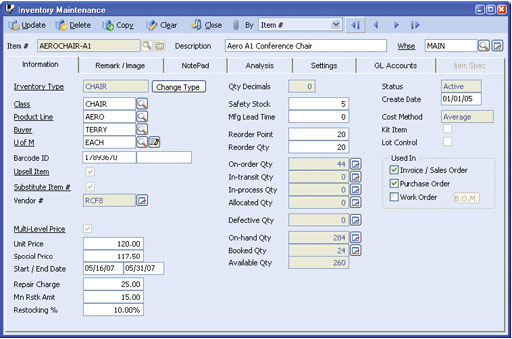 Inventory Specification Maintenance
Assign Specification Easily
After you have created an inventory item and are ready to assign specification codes, simply select from
previously created specification codes.
Define Warehouse Reorder Points and Quantities at the Specification Level
Warehouse reorder points and quantities can be set up for each
specification code combination assigned to an item. The reorder point
levels and quantities you set up will help determine what goods will
be ordered when using the Create Purchase Order by Reorder
Quantity function in the Purchase Order module. Use this feature to
designate separate reorder information for faster moving item
specifications.
Integration with Inventory Control, Sales Order, Accounts Receivable, Purchase Order, Upsell Management and Pricing Control Modules
Other Features
AccountMate Software Corporation © AccountMate Software Corporation. All rights reserved. Reproduction in whole or in part without permission is prohibited. The capabilities, Software Requirements and/or compatibility described herein are subject to change without notice. Contact AccountMate or Authorized AccountMate Solution Provider for current information. |
||||||||||||||||||||||||||||||||||||||||