


|
|
|
 |
With AccountMate’s Inventory
Control Software
|
|
AccountMate 7 for SQL or Express Multiple Cost Methods for Inventory Items
Each inventory item can be assigned a different cost method chosen from among the following:
Average, FIFO, LIFO, Specific ID or Average with Serial Number.
Support Serial Number Tracking
Assign serial numbers to units of your inventory that use either the Specific ID or Average with Serial
Number cost methods. Serial numbers coupled with the Specific ID cost method allow you to track
individual units and unit costs throughout the system. Serial numbers can be printed on invoices
and reports, entered directly, assigned automatically by simply entering a few parameters or
imported from text files.
You can run the Inventory Serial Number Report to view details of transactions affecting serialized items. This report shows the transaction type and number to identify the purchase, sale or use of a particular serial number. 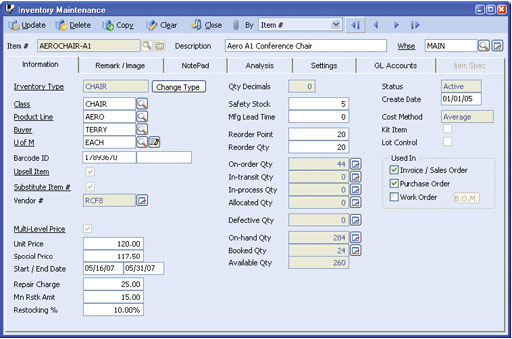 Inventory Maintenance
Physical Inventory Counts
Inventory counts can be performed at any time and as often as needed. They can be processed
without interrupting shipping and receiving processes. You can freeze inventory and update physical
count results for a range of warehouses. Worksheets can be printed to record inventory count
results. Physical count variances will be expensed against user-defined General Ledger account IDs
and recorded as an adjustment to inventory assets in the General Ledger. A Physical Count Variance
Report can be generated for audit trail purposes.
Designate Different Default Units-of-Measurement for Inventory Stock, Purchase or Sale
Assign a different unit-of-measurement that will be used to stock inventory, record customer sales or
process purchase transactions. This gives you greater flexibility to maintain and transact inventory in
different groups of units based on such factors as your product packaging requirements and those of your
vendors. At the same time, you will be cutting down on the data entry required when recording inventory
sales and purchases.
Inventory Type Settings Speed Up Creation of Inventory Records
Standardize the information and default settings that will be
assigned to new inventory records. You can preassign warehouses
and bins, units-of-measurement, cost method, revenue code and
lot, as well as kit and item specification settings. This feature helps
reduce data entry time and errors.
Multiple Vendors Tracked for Each Inventory Item
Inventory items may be purchased from different vendors at
different units-of-measurement. When Inventory Control is
integrated with the Purchase Order module, multiple vendors can
be tracked for each inventory item, with each vendor's price
converted to the smallest unit-of-measurement for effective
comparison. A Best Price Listing feature aids in determining the
best vendor price, keeping purchasing costs at a minimum. If you
have some vendors using foreign currency, enter the inventory
item’s unit price in the vendor’s currency freeing you from the
inconvenience of manually converting vendor prices. When creating
purchase orders, the system recommends either a designated
default vendor or the best price-per-unit vendor.
Support Bar Code
A bar code for a UPC or SKU number can be maintained for each
inventory item. Sales order and invoice line items can be entered
by simply scanning the product bar codes.
Inventory Transfer between Items, Warehouses and Bins
Inventory items can be repackaged into smaller or larger units-ofmeasurement
and can be transferred from one bin or warehouse
to another. The transfer can be performed for one or several
inventory items at a time. Freight and cost adjustments can also be
recorded for each transfer. Generate a Warehouse Transfer Slip to
send along with the transferred inventory as an additional control.
Any transfer cost variance is automatically calculated for proper
cost accountability. Transfers between warehouses can also be
treated as “in-transit” until the items are recorded as received at
the destination warehouse.
Internal Stock Issuance
The same inventory that you sell to customers or use as
manufacturing or kit components can also be used internally by
your company. The Internal Stock Issuance function facilitates
recording of multiple inventory items issued for internal company
use. Each batch of items issued can be posted to a user-defined
General Ledger Account ID to properly assign the items’ costs to
the department to which they are issued.
Mass Inventory Price and Cost Adjustments
Unit, basic and multi-level prices for all or selected inventory items
can be easily updated by automatically applying a percentage or
fixed amount to the current item prices or costs. Standard costs
and return costs can be adjusted in the same manner.
Inventory Adjustments
Adjustments can be recorded for any inventory item at any time.
AccountMate allows you to adjust an item’s quantity, unit cost or
total value in a particular warehouse and bin, and to specify the
General Ledger account to which the adjustment will be posted.
Use this feature to correct variances between your inventory ledger
balances and your inventory account balance in the General
Ledger to update item quantities for shrinkage or to revalue
outdated inventory.
Mass Copy Inventory
AccountMate has the ability to copy inventory records from one
company or warehouse to another, including the item numbers,
descriptions, units-of-measurement, assigned Revenue Codes and
General Ledger account IDs. You are able to adjust the Revenue
Codes, Inventory and In-transit Inventory General Ledger account
IDs to suit your company’s requirements.
Integration with other modules
Other Features
AccountMate Software Corporation © AccountMate Software Corporation. All rights reserved. Reproduction in whole or in part without permission is prohibited. The capabilities, Software Requirements and/or compatibility described herein are subject to change without notice. Contact AccountMate or Authorized AccountMate Solution Provider for current information. |
|||||||||||||||||||||||||||||||||||||||||