


|
|
|
 |
AccountMate’s General
Ledger module gives
maximum control over the
management of all your
accounting transactions.
Whether setting up
and maintaining a chart
of accounts, generating
financial statements Software
|
|
AccountMate 7 for SQL or Express Multi-Segment Chart of Accounts Offers Maximum Flexibility
Account ID’s can be up to 30 characters in length, with up to 9 segments. You can define major
account segments, departments, projects, divisions, locations, and other business segments. These
segments may be set up in a preferred sequence, eliminating the restriction to use the first segment
as the major account segment that many other Accounting applications impose.
Automate Segment Account Descriptions
AccountMate automatically copies all segment descriptions to the account description, allowing
faster creation of new accounts. The default General Ledger Account Description can be changed
to suit your needs.
Set Up Posting and Allocation Accounts
An account can be designated as either a posting account or an allocation account. Amounts
can be entered directly into posting accounts or they can be entered into allocation accounts
and pro-rated among the various assigned posting accounts.
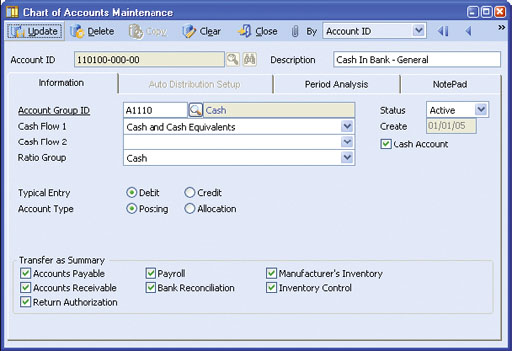 Chart of Accounts Maintenance
Flexible Account Number Setup
Account IDs for a new department, division or other business segment can be automatically
generated based on an existing department, division or other business segment. Also, accounts
can be copied across companies that have the same General Ledger Account ID structure.
Segment Definition is Modifiable
You are able to redefine account segments at any time. Flexibility exists to add new segments, lengthen
existing segments and change existing segment names, types and sequence. These features make it easy
to update the Chart of Accounts as your company’s reporting needs evolve.
User-Definable Fiscal Periods
Define up to 52 periods for your fiscal year, with options for defining
weekly, monthly, quarterly or other fiscal periods. AccountMate’s
General Ledger automatically adds an extra year-end adjustment period.
Fiscal and Posting Period Control
Define the beginning and ending dates of a company’s fiscal year
and its fiscal-period date ranges. You can set your fiscal year to cover
more or less than 365 days. This is a useful feature for companies
that have the “4-4-5 period setup”. In addition, a Posting Period
Restrictions function provides the ability to prevent recording of
transactions that generate journal entries for posting to a selected
period in the General Ledger. This protects the restricted period from
further changes when a final statement is being prepared for the
period or when the period’s account balances have been audited.
Financial Report Drill-Down
You can reconcile General Ledger statement information with
subsidiary module transactions by drilling down on the amounts
in the Income Statement and Balance Sheet for viewing their
composition in the General Ledger Listing. From the account balance
details, you can further drill down to view the source batch’s posting
entries, and ultimately drill down to a report showing the source
transaction details. This allows for easy and flexible reconciliation of
major General Ledger account balances with your subsidiary ledger
balances (i.e. Customer, Vendor and Inventory balances).
Journal Entry Creation and Editing
Journal entries can be created from scratch or imported from text
files, copied from existing journal entry batches or generated from
recurring journal entry templates. To further speed up journal entry
creation, entries can be copied from Microsoft Excel and pasted on
the journal entry grid. Journal entry descriptions and references can
be automatically applied to each journal entry line. Journal entries can
be edited before posting and can be viewed, printed and voided after
posting. Reversing entries are generated automatically, saving time
and reducing errors.
Support Multi-currency Transactions
The General Ledger module allows recording of journal entries in
a foreign currency. It supports posting of journal entries in both the
home and foreign currency for those multi-currency transactions
recorded in the subsidiary ledgers. It uses the exchange rates defined
for the currency codes maintained in the system to help ensure
consistency in recording multi-currency transactions.
Flexible Budget Set Up and Export/Import
AccountMate supports multiple sets of budget data. Each set can be
configured for all or a range of posting accounts, and can also be used
to identify variances between actual and budgeted amounts. Budgets
can be set up individually or by applying a percentage of existing
actual or budget amounts. Budget amounts can be entered directly
into individual periods or annual amounts can be averaged over the
fiscal periods. Budgets can be exported to spreadsheets for further
computation and analysis and then imported back into the system.
Perform or Schedule Batch Period-End Closing and Transfers to General Ledger
For convenience, the General Ledger module provides the ability
to perform period-end closing or to transfer data to General Ledger
for a range of periods and a group of modules. It also provides the
option to schedule batch closing or transfer to run at a later time
thus allowing for scheduling the closing or transfer at the end of
a business day.
Ready for Fund Accounting
When you select the Use for Non-Profit Organization option for a
new company, the General Ledger functions, fields and reports are
automatically switched as follows to support fund accounting:
AccountMate Software Corporation © AccountMate Software Corporation. All rights reserved. Reproduction in whole or in part without permission is prohibited. The capabilities, Software Requirements and/or compatibility described herein are subject to change without notice. Contact AccountMate or Authorized AccountMate Solution Provider for current information. |
||||||||||||||||||||||||||||||||||||||||