


|
|
|
 |
AccountMate’s Contact
Manager module is a Software
|
|
AccountMate 7 for SQL or Express Track Detailed Contact Activity
Use the Activity tab to enter and track more detailed information about customer contacts.
This feature includes the ability to set up activity records to represent prospect sign-up,
contract negotiation, customer complaints and all other types of cases that may arise from
contacts with a customer or prospect. You can break down each activity into different stages
(i.e. presales call, close sale, problem reporting or case resolution) to more accurately track
the progress of these cases. Assign access rights to view or update these activity entries
to the different users set up for the company.
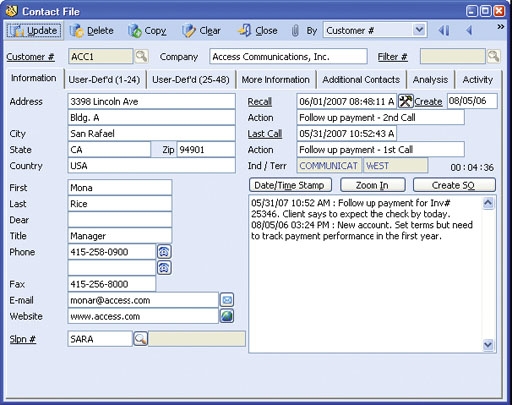 Contact File—Information Tab
Enhanced Contact Management
You can quickly contact a customer or prospect, enter and review the salient points of each contact,
track your communications in the order in which they occurred and perform mass mailing and/or
e-mail distribution to customers and prospects. There are integrated electronic mail capabilities that
utilize any of the popular Microsoft mail systems, such as Microsoft Exchange or Microsoft Office and
support direct e-mail communication with contacts and customers. The system also supports
automatic modem-dialing so you can call customers and prospects directly from inside the
AccountMate program.
Complete Contact Record Information
Each contact record includes complete contact informaion: date/time stamped contact notes, contact
name, title, company, address, fax and phone numbers, e-mail address, last and next call dates, last and
next action, industry and territory.
User-Defined Fields
Up to 48 user-defined fields can be added to contact records. Contact
Manager is easily customizable by defining field names, type (character,
date, logic or numeric), width and number of decimal places.
Easy-to-use Contact Management Database
Search and retrieve contact records by company name, contact
name, zip code, telephone number, recall date, salesperson number
or by using any of a wide variety of other search filters. Further
enhance sorting abilities by defining your own filters using data fields
that come standard with AccountMate or the user-defined fields that
have been created. Use the Mass Search and Replace function to
quickly update data in one or more fields for all customers who
qualify under the defined search criteria.
Seamless Integration with Microsoft Word
The Contact Manager database seamlessly integrates with Microsoft
Word for easy mail merge and correspondence. This allows for easy
retrieval of documents and labels created in Microsoft Word to
customize and print them from within Contact Manager.
Integration with Sales Order and Accounts Receivable Modules
When integrated with the Sales Order module, a sales quote or
an order can be created directly from the contact screen and it
can be faxed immediately. You are also able to drill down from the
contact screen to gain instant access to sales order details or quickly
examine critical financial information such as sales-to-date, Sales
Order backorder data, open credits or balances due without having
to leave Contact Manager.
When integrated with the Accounts Receivable module, you can view invoice and payment transactions recorded through the Accounts Receivable module and summarize, compare and graph monthly invoice transactions for any customer. Other Features
AccountMate Software Corporation © AccountMate Software Corporation. All rights reserved. Reproduction in whole or in part without permission is prohibited. The capabilities, Software Requirements and/or compatibility described herein are subject to change without notice. Contact AccountMate or Authorized AccountMate Solution Provider for current information. |
||||||||||||||||||||||||||||||||||||||||