


|
|
|
 |
With AccountMate’s Customer
Inventory Manager module
you Software
|
|
AccountMate 7 for SQL or Express Instant Access to Customer Information
You have easy access to all inventory items that are cross-referenced with a particular customer.
Tracking your own and your customer’s inventory numbers, inventory descriptions and units-ofmeasurement
gives you an edge in delivering superior customer service.
Cross-Reference a Range of Items
You can select and cross-reference items individually or select a range of items for which you can
set up customer inventory information.
Customer-Specific Contract Prices
Each customer can be assigned a specific contract price for each inventory item.
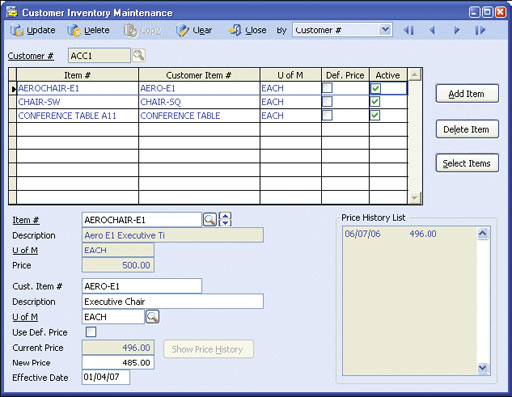 Customer Inventory Maintenance
Automatically Update Prices
You can automatically change customer contract prices on a predefined date. This ensures that your
sales staff is quoting the correct price when the customer places an order. Price updates can either
be performed immediately or they can be set to run daily, weekly or monthly on a recurring schedule.
The scheduled update feature is only available with the SQL database.
Pricing History
The Customer Inventory Manager module provides the ability to review a customer’s contract pricing
history. You can compare a customer’s historical contract price against the current price and any future
pricing plan. This is a useful tool when establishing contract pricing.
Display Customer Item Data in Transaction Records
Customer item numbers, descriptions and units-of-measurement
can be printed on sales orders and invoices to allow your customers
to better match details on these documents with their own internal
reports.
Customer Inventory Listing
You can view a customer’s history, showing both their inventory
numbers and yours, along with pricing history and any future pricing
scheduled. You have the flexibility to use the customer's inventory
numbers or your own, depending on what the customer desires.
Integration with Sales Order and Accounts Receivable Modules
Integration with the Sales Order and Accounts Receivable modules
allows you to use a customer’s inventory numbers for transactions
from order entry through shipment and invoicing. It also allows you
to use contract prices for customer orders.
Other Features
AccountMate Software Corporation © AccountMate Software Corporation. All rights reserved. Reproduction in whole or in part without permission is prohibited. The capabilities, Software Requirements and/or compatibility described herein are subject to change without notice. Contact AccountMate or Authorized AccountMate Solution Provider for current information. |
||||||||||||||||||||||||||||||||||||||||