


|
|
|
 |
Keeping an accurate tab
on cash flow is an important
part of your business
and AccountMate’s Bank
Reconciliation module has
a convenient way Software
|
|
AccountMate 7 for SQL or Express Manage Bank Accounts
Set up an unlimited number of bank accounts and indicate which currency is used for each account.
You can also set the starting check and deposit numbers for each account, define each account’s
maximum check amount and specify which bank accounts will be used in Payroll, Accounts Payable
and Accounts Receivable/Sales Order transactions.
Maintain Bank Routing Codes and Branch Information
Electronic bank routing codes for each bank account can be defined. These codes are used by the
Electronic Funds Transfer Agency (EFTA) to process transactions related to the bank account. You
are able to define the branch number and address for the bank branch where you maintain the
bank account. This information can be used when printing checks from the integrated
AccountMate Accounts Payable and Payroll modules.
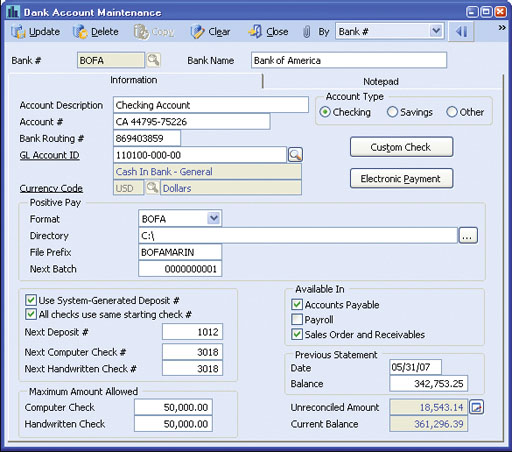 Bank Account Maintenance
Easy View of Real Time Cash Position
The system displays the current book balance for each bank account. It also shows the total
unreconciled amount with a drill-down that displays details of unreconciled transactions grouped into
debits and credits. These features give you a better grasp of your company’s real time cash position
to more effectively manage your resources.
Transaction Code Set Up
There is flexibility to set up transaction codes in order to classify transactions by type. This allows you
to easily identify the nature of the transaction entered (i.e. differentiate between charges for returned checks
and monthly service fees) and its effect on your bank account balance. The decision can be made to define
whether a check or deposit number must be entered for the transaction.
Currency Codes
Currency codes can be set up for each currency used to transact
business. These codes can be assigned to bank accounts, vendors
and customers to ensure that transactions are recorded using the
correct currency. Exchange rates can be updated at any time.
Easy Bank Account Reconciliation
Enter summary information from a bank statement such as the
ending balance and the total number and amount of checks or other
disbursements and deposits or other receipts. You can more easily
match bank statement data with the detailed information in
AccountMate since they are presented in a convenient grouping of
debit transactions in one tab and credit transactions in another tab.
Quickly reconcile bank account transactions by marking the checks
or other disbursements and deposits or other receipts listed against
those that appear on the bank statement.
Generate Positive Pay File for Fraud Protection
One tool to protect your company against check fraud is
AccountMate’s positive pay function. This allows you to generate a
positive pay file for Accounts Payable and Payroll checks that can be
sent to your banks. Arrangements can be made with your banks to
honor only those checks listed in the positive pay file. This is a most
effective fraud protection tool especially if your company issues a
large number of checks.
Record Receipts, Disbursements and Bank Transfers
Record deposits and other receipts (i.e. bank interest) or checks and
other disbursements (i.e. NSF charges) not entered through other
modules. This also includes recording transfers between two bank
accounts having the same currency such as a bank transfer into a
Payroll account or transferring funds between accounts that are in
different currencies.
Quickly Generate Recurring Transactions
Templates can be set up for recurring disbursements, receipts and
transfers that are not entered through other modules and can be
scheduled to happen on a specific cycle. These templates can be set
to recur at different intervals with a limit on the number of recurring
cycles and/or a recurring end date.
Support Multiple General Ledger Distribution Accounts
You can assign multiple General Ledger Account IDs to each
Transaction Code and to each check or other disbursement, deposit
or other receipt transaction recorded through this module. Use this
feature to allocate the receipt or disbursement among the various
reporting segments that benefit from the transaction. For recurring
receipts or disbursements, you can establish the percentage
distribution among the assigned General Ledger Account IDs based
on the allocation made to each affected reporting segment.
Generate Reconciled Bank Statements for Prior Statement Periods
The system maintains each month’s bank reconciliation data. This
provides the ability to review or print reconciled bank statements for a
prior period that can be submitted to banks, accountants, auditors or
other reporting agencies.
Integration with General Ledger, Accounts Payable, Accounts Receivable and Payroll Modules
Other Features
AccountMate Software Corporation © AccountMate Software Corporation. All rights reserved. Reproduction in whole or in part without permission is prohibited. The capabilities, Software Requirements and/or compatibility described herein are subject to change without notice. Contact AccountMate or Authorized AccountMate Solution Provider for current information. |
||||||||||||||||||||||||||||||||||||||||