


|
|
|
 |
With AccountMate’s Accounts
Receivable module, you have
the power of a complete
invoicing, receivable, customer
and inventory management
system in order to provide
customers with prompt
service.
Software
|
|
AccountMate 7 for SQL or Express Instant Access to Customer Information
You have instant access to customer balances, past due totals, payment history on outstanding
invoices, open credit, available credit and year-to-date and accumulated-to-date sales totals while
processing an invoice. Year-to-date sales information is calculated based on a start date that is
defined separately per customer for maximum flexibility.
Enhanced Customer Maintenance Functions
Average Days to Pay Information—View the average number of days it takes to collect
receivables from a customer before processing an invoice. Use this feature with the available credit
information to evaluate the suitability of the credit terms granted to a customer.
Customer Ledger Card—Drill down information displays details of a customer’s sales invoices and the related payment information, credit invoices, invoice line item distribution, finance charges, taxes, freight and customer deposits. 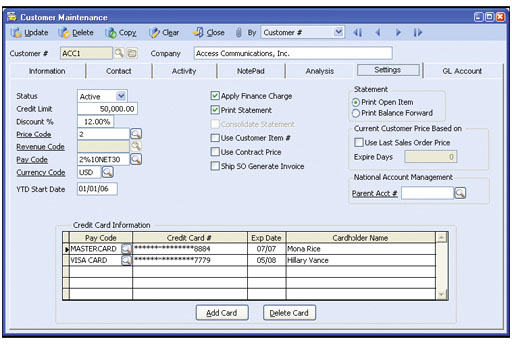 Customer Maintenance—Settings Tab
Activity Tab—Record and track detailed contacts made with the customer within the Activity
tab. You can define an unlimited number of activity records, with unlimited status values to represent
different contact phases for each activity. It’s possible to define access rights for various
AccountMate users to view and/or update Activity tab entries.
Credit Card Encryption—Credit card numbers are secured internally so viewing of credit card numbers can be restricted to those who have been granted access rights. If an employee does not have the required access rights, they will see only the last four (4) digits of the credit card number preceded by asterisks (*). For further security, credit card numbers are also encrypted in the database. This allows companies to tightly control access to credit card information. National Account Management—Link several customers to another customer that represents their Parent or National Account. This is useful not only to consolidated companies but also to multi-location companies with centralized payment processing systems. Set up separate customer records for locations or subsidiaries of the same company while designating a parent customer account from which payment is generally received. This simplifies the collection process, while still giving the flexibility to separately maintain sales, credit and receivable information for each location or subsidiary. Comprehensive Inventory Information
Add a picture of the product to each inventory item record and
enter product notes in the accompanying inventory notepad. These
powerful customer-service tools can be quickly accessed while
processing customer invoices. Inventory information such as
on-hand quantities, on-order quantities, booked quantities, item
classes and product lines is also visible on the invoice screen.
Multiple Substitutes for Inventory Items
Each inventory item can be assigned multiple substitute items that can
be used to fill orders for items that have insufficient quantities on hand.
Multi-level Pricing for Inventory Items
Set multi-level prices for inventory items. Different prices can be
assigned to inventory items based on a customer's price code or
based on the order quantity.
User-Defined Pay Codes with Option to Define Complex Discount and Due Date Terms
An unlimited number of pay codes can be created to set credit
terms, and help management analyze receivables and customer
payment information. Complex discount and due date terms can
be defined through a date table. You can define the discount day,
discount month, due day and due month of invoices issued on or
before a particular day of the month, or there is an available option
to use End-of-Month discount and due terms.
Maintain Sales Tax Entities
Multiple sales tax entities can be set up and attached to one or
more sales tax codes. You can define a tax rate, active/inactive
status and separate sales tax payable and sales tax cost General
Ledger Account IDs for each sales tax entity. For more complex tax
policies, set minimum and maximum taxable and tax amounts as
well as rounding method.
Built-in Multi-Currency Feature
When multi-currency is activated, a foreign currency code can be
assigned to a customer, providing billing in the appropriate currency.
The system automatically computes the realized gains or losses upon
collection of foreign customer invoices. Outstanding foreign currency
invoices can be revalued based on a user-defined exchange rate as
of a selected revaluation date.
Recurring Invoices
Multiple recurring-invoice templates can be set up for each customer.
Invoices can be set to recur at different intervals with a defined number
of recurring cycles and/or an end date. Use this feature to bill for
professional or retainer fees, maintenance or service plans and
similar transactions.
Flexible Sales Return Processing
Process sales returns either based on an existing sales invoice record
or independent of one. A validation process in the Create Sales
Return with Invoice number function helps to ensure that quantities
being returned do not exceed the "non-returned" quantities (invoiced
quantity less accumulated returns) on a given invoice.
Comprehensive Apply Payment Function
A customer’s payments and open credits can be applied to its own
invoices along with any payment discounts, adjustments or write-offs.
In addition, AccountMate provides the option to post each type of
payment adjustment to a different General Ledger account. With the
National Account Management feature, you can apply receipts or
open credits received from a Parent Account to pay off the accounts
of its various subsidiaries. The option is available to apply open
credits from one subsidiary to another subsidiary’s invoices.
Customer Refund
Customer open credits can be partially or fully refunded. Refunds
can be issued as credit card reversals, cash refunds or check
refunds. You can also post on-the-fly an Accounts Payable invoice
against which you can quickly issue a refund check.
Void Customer Payment, Refund or Adjustment
AccountMate provides the ability to correct errors when applying
payments, credits or when processing customer refunds. You can
separately void applied adjustments, discounts or write-offs.
Enhanced Customer Statement Printing
Print Customer Statements directly from the drill-down balance field
caption on the Customer Maintenance screen. If the customer
balance includes past-due invoices, a “Past Due” notation is printed
on the customer statement. For each customer, you are able to
choose between printing balance-forward or open-item statements.
You are also able to define whether to combine the subsidiaries’
invoices in a customer statement generated for a Parent Account.
Apply and Adjust Finance Charges
Finance charges can be applied to all or selected customers. They
can be calculated based on the statement balance or on individual
invoices either by percentage or fixed amount. Applied finance
charges can also be adjusted or voided.
Integration with General Ledger, Sales Order, Upsell Management, Customer Inventory Manager, Return Merchandise Authorization, Inventory Control, Pricing Control, Inventory Specification, Lot Control and Kitting Modules
Other Features
AccountMate Software Corporation © AccountMate Software Corporation. All rights reserved. Reproduction in whole or in part without permission is prohibited. The capabilities, Software Requirements and/or compatibility described herein are subject to change without notice. Contact AccountMate or Authorized AccountMate Solution Provider for current information. |
|||||||||||||||||||||||||||||||||||||||||