


|
|
|
 |
No matter how high a
company’s revenues,
without a full-featured
Accounts Payable system
it can still lose money. With
AccountMate’s powerful
Accounts Payable module,
you can avoid duplicate
invoices and late payments,
require that invoices entered
into the system be supported
by purchase orders and
automatically take advantage
of Software
|
|
AccountMate 7 for SQL or Express Instant Access to Vendor Information
Always have instant access to a vendor’s balance, open debit, available credit and year-to-date and
accumulated-to-date purchase totals while posting an invoice for the vendor. Year-to-date purchase
information is automatically calculated.
Enhanced Vendor Maintenance Functions
Vendor Ledger Card—Drill down information displays details of the vendor’s balance, showing
the invoices, prepayments, payments and invoice distribution.
Activity Tab—Record and track in detail contacts made with the vendor. Define an unlimited number of activity records with contact phases for each activity. Access rights to view and/or update Activity tab entries can be defined by the user Set up Authorized Referenced Accounts
Set up a list of General Ledger Account IDs that may be used when posting Accounts Payable
invoices for a vendor to minimize data entry errors and control the transactions that affect your
General Ledger Account balances.
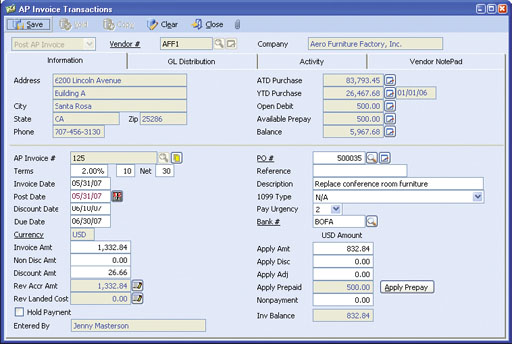 AP Invoice Transaction—Information Tab
Invoice Payment Urgency Code
A payment urgency code can be assigned to each invoice to help prioritize invoice payments
and check printing.
Warning about Duplicate Invoices
If a payable invoice with the same invoice number has been recorded for a vendor, an alert appears
to help prevent duplicate invoice recording. Invoice look-up is also available during invoice posting to
determine whether the invoice is paid or outstanding.
Automated Prepayment Features
With the prepayment invoice entry feature, you are able to process payments even before you receive
a vendor’s invoice. AccountMate posts the disbursement to a prepayment General Ledger account and
handles the expense posting when the prepayment is applied to vendor invoices.
Recurring Invoices
Recurring Accounts Payable invoice templates are easily set up for
rent, loan payments and other recurring disbursements. Invoices can
be set to recur at different intervals with a defined limit to the number
of recurring cycles and/or a recurring end date.
Purchase Order Lookup
The capability exists to view all purchase orders for a selected vendor
while posting an invoice helps in matching a purchase order to an
invoice.
Mass Payment Authorization
Several invoices can be authorized for payment based on due
date, urgency, discount date, vendor or reference. The system will
automatically calculate early payment discount and payment amounts
for each invoice.
Nonpayment Invoicing
When recording an invoice, designate the amount that will not be
paid. This is especially useful when part of an invoice is paid directly
by a third party or offset against a receivable.
Link with Purchase Order Module
Invoices can be matched to specific purchase order line items,
providing you with the ability to monitor which of your received items
have been invoiced. In addition, this feature provides the ability to
enter the per unit invoiced cost of an item. The system compares the
projected cost (taken from the Purchase Order) and the invoiced cost
and reflects any difference in a cost variance account. In the same
way, non-physical charges (such as freight and service charges) that
were recorded when the goods were received can also be matched
to the accounts payable invoice.
1099 Payments
You can set up a default 1099 type for each vendor and override
the 1099 type when recording invoices. AccountMate tracks 1099
payments and produces the appropriate 1099 reports. You can
also specify the minimum cumulative amount of each type of 1099
payment within the year that will require you to issue a Form
1099-Misc for the vendor.
Credit Card Handling
Credit cards are a payment option when setting up a vendor. When
credit card vendors are set up, you can record purchases against
each vendor account and record payment through one or several
credit card companies. Journal entries are generated to reclassify
the payable balance from the original vendor to the credit card
companies.
Built-in Multi-Currency Feature
When multi-currency is activated, a foreign currency code can be
assigned to a vendor, providing billing in the appropriate currency.
The system automatically computes the realized gains or losses upon
payment of foreign vendor invoices. Outstanding foreign currency
invoices can be revalued based on a user-defined exchange rate as
of a selected revaluation date.
Flexible Check Printing Options
Print checks on either pre-printed or logo check stock. You are able
to customize the order in which the bank routing number, account
number and check number are printed using the Microline font that
comes standard with AccountMate. Checks can be printed
immediately for petty cash-type disbursements.
Record Wire Payments and Handwritten Checks
This function allows users to record wire payments and handwritten
checks that were issued outside of the regular check-printing cycle.
Record Cleared Checks
Users can view all outstanding Accounts Payable checks drawn
against a bank account. Reconcile bank accounts quickly by
matching the checks displayed on-screen against the current bank
statement to easily identify which checks have cleared the bank.
Integration with Purchase Order
Integration with the Purchase Order module allows you to record
and track a purchase transaction from order entry, through receipt
and invoicing, to payment. This allows more effective management
of your inventory and vendor relationships.
Other Features
AccountMate Software Corporation © AccountMate Software Corporation. All rights reserved. Reproduction in whole or in part without permission is prohibited. The capabilities, Software Requirements and/or compatibility described herein are subject to change without notice. Contact AccountMate or Authorized AccountMate Solution Provider for current information. |
||||||||||||||||||||||||||||||||||||||||